 JuiceBlock
How to play JuiceBlock
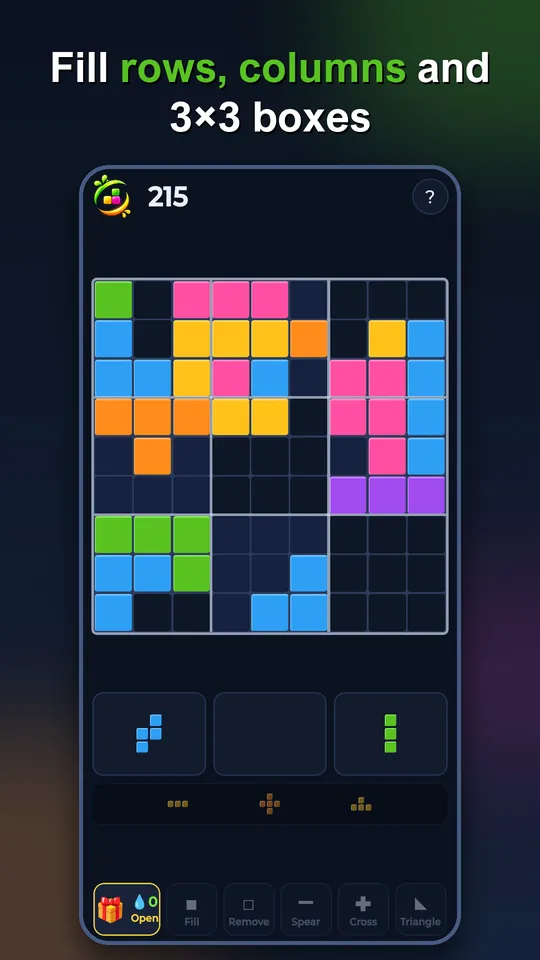
JuiceBlock is a block puzzle on a 9 × 9 board. Drag pieces onto the board, fill a row, a column or a 3×3 box, and watch it clear. The round ends when none of your pieces fit anywhere.
The board
The board has 81 cells, divided into nine boxes of 3 × 3. Every other box is slightly lighter, so you can see the boxes at a glance.
You clear cells in three ways:
- A full row – all nine cells from left to right.
- A full column – all nine cells from top to bottom.
- A full 3×3 box – all nine cells in one of the boxes.
When a placement completes more than one of these at the same time, they all clear together, and the bonus grows quickly (see scoring below).
The pieces
You always get three pieces at a time, shown below the board. Place them in any order you like. When all three are on the board, three new ones arrive.
- Pieces are made of 1 to 5 squares joined edge to edge: single squares, bars, L-shapes, squares, T-shapes and the rarer five-square shapes. In total there are 21 shapes in 91 orientations.
- Pieces cannot be rotated. The orientation you get is the one you have to place.
- A low strip under your pieces shows the next three pieces, so you can plan ahead.
- Pieces that do not fit anywhere right now are shown dark.
- While you drag, a white shadow shows exactly where the piece will land, and any row, column or box that will clear lights up before you let go.
The piece generator never looks at your board. It does not slip you an easy piece to rescue you, and it does not punish you with an impossible one. In Endless the pieces get gradually more demanding the longer you play.
Scoring and combos
| What you do | Points |
|---|---|
| Place a piece | 1 point per square |
| Clear 1 line or box | +10 |
| Clear 2 at once | +30 |
| Clear 3 at once | +60 |
| Clear 4 at once | +100 |
| Clear 5 or more at once | +150, +210, +280 … |
Combo: if you clear something on several moves in a row, the combo rises and multiplies the clear bonus of your next clear: ×2, ×3, ×4 and at most ×5. One move without a clear resets it.
Example: you clear one line (+10), then one line on the next move (+10 × 2 = 20), then two lines at once (+30 × 3 = 90). Those three moves give 120 bonus points plus the squares you placed, instead of 50 without the combo.
Juice and the tools
Below the pieces is a row of tools and the Juice tank. The tank fills one section for every set of three pieces you complete. After five sets it turns into a gift 🎁 with one random tool. Fill and Remove are the most common, Triangle the rarest. In the app, opening a gift shows a short ad, which is always optional.
| Tool | What it does |
|---|---|
| ◼ Fill | Fills one empty cell. Can complete a line. |
| ◻ Remove | Removes one cell. |
| ━ Spear | Removes four cells in a row, horizontal or vertical. |
| ✚ Cross | Removes five cells in a cross. |
| ◣ Triangle | Removes six cells in a 3-2-1 staircase. Can be rotated. |
To use a tool: pick it, tap a cell on the board, check the preview and tap «Use». Tools give points for what they clear but do not affect your combo. When you are stuck and still have tools, the round does not end straight away: you get the chance to use them first.
Your ranking shows how many tools you used. A round with no tools is marked Pure, so a clean score can always be told apart from an assisted one.
Four ways to play
Controls
- Phone and tablet: touch a piece, drag it onto the board and let go.
- PC and Mac: the same with the mouse – click, hold, drag and release.
- The JuiceBlock logo at the top left pauses the game and opens the menu with all the rules. «?» shows the short guide again.
- Music, sound effects and vibration can be turned off separately in the settings.
The first time you open a mode, a short guide walks you through the screen one element at a time.